A plumber’s business card is often the first tangible impression someone has of your brand…so don’t settle for a generic template. A well‑designed card should communicate reliability, fit your brand aesthetic and make it easy for homeowners to contact you. The following design tips will help you create cards that stand out and convert.
Start with Your Brand Identity
Your business card should feel like a miniature version of your brand. Consistency builds recognition, whether someone finds you online or from a referral. Before diving into layout, make sure you have a solid logo, color palette and font family.
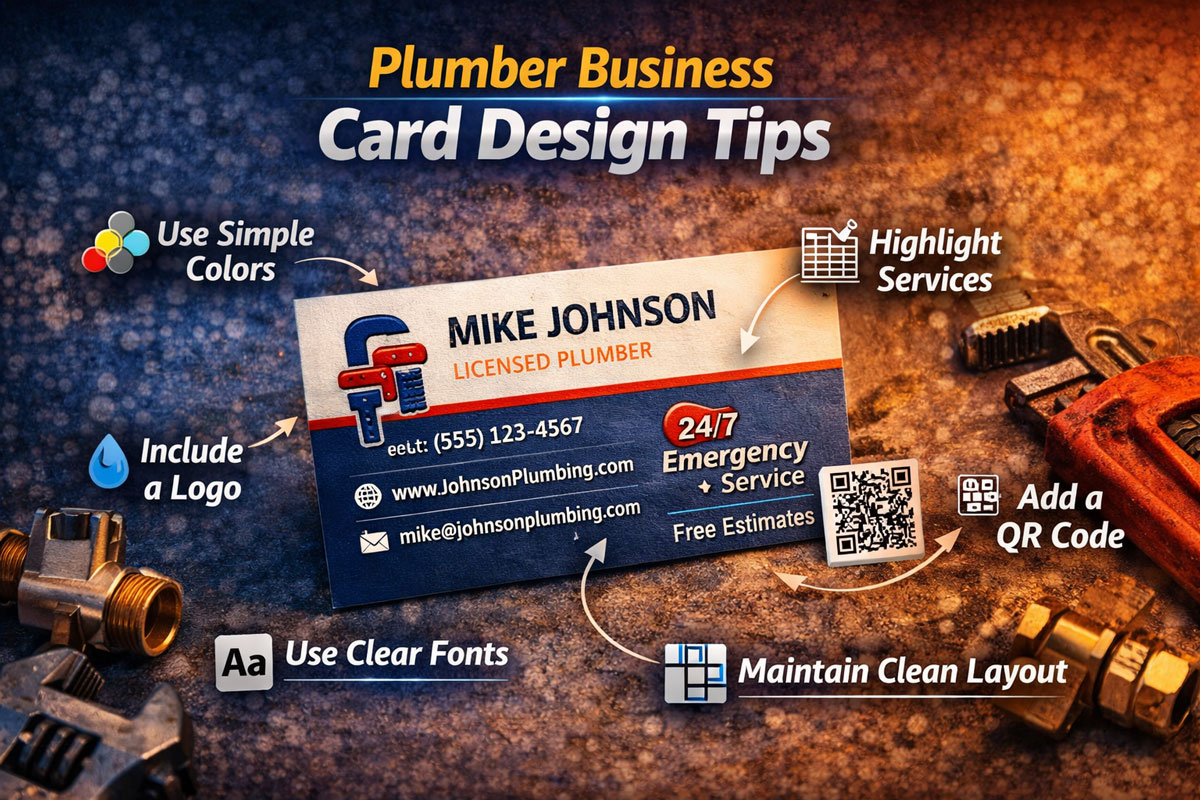
- Use your brand colors: Incorporate the same hues found on your trucks, website and other marketing materials. Blue often conveys trust and reliability, while green can signal eco‑friendliness.
- Stick to one or two fonts: Sans‑serif fonts like Helvetica or Open Sans are easy to read at small sizes. Pair a clean heading font with a simple body font for hierarchy.
- Include your logo prominently: Place your logo at the top or corner of the card so it anchors the design. Make sure it remains legible when scaled down.
- Match tone and voice: If your brand is friendly and casual, reflect that in your copy. If you position yourself as premium and technical, choose more formal language.
Choose the Right Layout & Orientation
The way you arrange information influences how readers process it. Traditional landscape cards remain popular, but vertical cards can be eye‑catching. Plan your layout based on the amount of information you need to convey.
- Landscape vs vertical: Landscape cards feel classic and familiar, while vertical cards stand out among a stack of horizontals. Choose vertical only if you’re confident it fits your brand and won’t compromise readability.
- Single vs double sided: Use double‑sided designs to list your services or a special offer on the back, keeping the front uncluttered. Single‑sided cards work when you offer a limited range of services and want an ultra‑minimalist look.
- Clear hierarchy: Arrange elements from most to least important: logo and name, contact details, then supplementary information. Use larger font sizes and bold text to guide the reader’s eye.
- White space is your friend: Don’t cram every inch with text or graphics. Generous margins make the card look polished and make the content easier to read.
Fonts, Colors & Imagery
Typography and color choices can either elevate your card or make it look amateurish. Good design balances visual interest with functionality.
- Prioritize legibility: Avoid decorative script fonts that are hard to read. Use a minimum of 8–9 pt font size for contact details; larger fonts for headlines.
- High contrast: Dark text on a light background offers the best readability. If you choose a dark card, ensure the text is large and in a light color.
- Use imagery sparingly: A simple icon, plumbing wrench graphic or subtle watermark can reinforce your trade. Avoid low‑quality photos that may print poorly.
- Color psychology: Blue and black suggest professionalism, while orange or red can convey energy. Align your palette with the perception you want to create.
- Coordinate with other materials: Tie the color scheme into your door hangers, flyers and mailers for a cohesive brand experience.
Materials & Finishes
The tactile quality of your card leaves a lasting impression. Cheap, flimsy cards reflect poorly on your workmanship. Invest in materials that communicate quality and durability.
- Thick cardstock: Choose at least 14 pt paper. For a premium feel, consider 16 pt suede or even plastic cards.
- Matte vs glossy: Matte finishes feel refined and are easier to write on, while glossy finishes make colours pop. Consider using matte on the front and gloss on the back for added contrast.
- Special finishes: Spot UV, foil stamping and embossing add tactile and visual interest. Use these effects sparingly to highlight your logo or call to action.
- Rounded corners or die‑cuts: Softer edges prevent cards from fraying in wallets. A custom shape can make your card memorable, but ensure it still fits standard holders.
- Waterproof or tear‑resistant stock: If your technicians are frequently outdoors or near water, select a material that withstands moisture.
Make It Interactive
An interactive element encourages recipients to engage with your card rather than tossing it in a drawer. Simple additions can drive them to your online platforms or prompt future contact.
- QR codes: Send prospects directly to your booking calendar, special offers or a gallery of business card examples. QR codes appeal to customers who prefer digital convenience.
- Tear‑off tabs: Create a perforated section with a coupon or referral discount. Customers can redeem it while retaining the main card.
- Personal notes: Leave space where you can jot down a personalized tip or appointment time. Handwritten touches make customers feel valued.
- Seasonal versions: Design a batch of cards with seasonal offers (e.g., winter pipe inspections) and rotate them throughout the year. Variation encourages repeat contact.
Mistakes to Avoid
Even experienced marketers make missteps when designing business cards. Avoid these common pitfalls to ensure your cards project professionalism and clarity.
- Overloading information: Don’t turn your card into a brochure. Limit copy to essential details and one or two secondary messages. Use other formats like postcards or direct mail for in‑depth promotions.
- Poor contrast: Dark text on a dark background or light text on a light background reduces legibility. Always test your design at actual size before ordering.
- Neglecting proofing: An incorrect phone number or misspelt website address renders your cards useless. Triple‑check the details before printing.
- Ignoring print bleed: If background colors or images extend to the edges, include bleed in your design file to prevent white borders after trimming.
- Using low‑resolution files: Ensure logos and images are at least 300 DPI. Fuzzy graphics signal lack of professionalism.
Distribution & Implementation
Even the best designed card won’t generate calls if it stays in a box. Plan how you’ll distribute them to maximize exposure.
- Order in batches: Print enough cards for at least six months of business to avoid running out. Smaller runs allow you to test different designs.
- Outfit your team: Provide stacks of cards to technicians, apprentices and office staff. Encourage them to hand a card to every customer upon finishing a job.
- Include in direct mail: Insert a business card into your EDDM mailers or invoices for added brand presence.
- Network strategically: Take cards to trade shows, real estate offices and local networking groups. A physical card is quicker to exchange than entering information into a phone.
- Track and refine: Use different coupon codes on batches of cards and record which ones generate calls. Adjust designs and messaging based on real performance.
Frequently Asked Questions
Do vertical business cards look unprofessional?
Not necessarily. Vertical cards stand out when placed next to standard horizontal cards. They’re best suited for modern, design‑forward brands and should only be used if the information fits comfortably.
Should I print on metal or plastic?
Metal or plastic cards create a premium impression, but they’re more expensive. Consider them for VIP clients or as part of a referral program; for everyday use, thick cardstock provides durability at a reasonable cost.
How often should I redesign my business cards?
Update your card whenever you change contact information, add services or refresh your logo. Periodic refreshes… every couple of years… also keep the design from feeling dated.
Need Expert Design Assistance?
Ready to elevate your business cards? Our designers specialize in business card design for plumbers. We’ll align your cards with your overall branding strategy and integrate them seamlessly with other print and digital assets. Contact us to discuss your next design today.