At Tight Designs & Printing Company of Florida, we get a lot of the same questions every day… pricing, design help, paper quality, and how to upload files. This page answers the most common questions in plain English so you can move faster.
Company FAQ
1. What services does Tight Designs offer?
Tight Designs offers graphic design, web design, print, branding, signs, apparel, and branded marketing materials for businesses in Pembroke Pines and surrounding areas.
2. Can you help with both design and printing?
Yes. Tight Designs can help with both the design side and the printed final product, depending on what your project needs.
3. Do you offer logo design and branding?
Yes. Tight Designs can help with logo design, brand visuals, messaging direction, and branded materials that help businesses look more established.
4. Can you design websites too?
Yes. Tight Designs offers web design support for businesses that need a more professional online presence.
5. What print products do you offer?
Common projects include business cards, postcards, flyers, brochures, signs, banners, apparel, and other branded marketing materials.
6. Do you work with new businesses?
Yes. Tight Designs works with both established businesses and people just getting started who need help looking professional from the beginning.
7. Do you only work with businesses in Pembroke Pines?
No. Tight Designs works with many businesses in Pembroke Pines, Broward, and Miami-Dade, and can also help clients in other areas depending on the project.
8. How do I get started?
The best way to get started is to contact Tight Designs with your project details, business needs, and any files or ideas you already have.
Print Order FAQ
- Can I split an order into different designs and still get the bulk price?🔗
- How do I make a change on my print order?🔗
- Do the prices include design?🔗
- What does “print-ready artwork” mean?🔗
- How should I set up a Spot UV job?🔗
- Can I pick up my prints the same day?🔗
- Large Format FAQ (banners, posters, signs)🔗
Can I split an order of prints into several different designs to receive the same price?
Usually, no… bulk pricing is based on one design printed in one big batch. If you split it into multiple designs, it turns into multiple smaller jobs, and the price updates to match that.
If you want the best deals, order larger quantities when you can, or check our daily discount deals here.
How do I make a change on my print order?
Most orders start processing right away so your job can move quickly.
If the job is plated, it means it has already “left the editing stage” and is now in production… kind of like sending food to the kitchen after you already placed the order. At that point, changes to the design, quantity, or product options usually can’t be made.
Shipping changes may still be possible if you contact us before the items leave the facility.
Does the prices include design?
The price shown on each product page is for printing only.
Sometimes we can help with a very small tweak that takes just a few minutes. But if you need full design work (logo placement, layout, photos, clean-up, etc.), that is quoted separately.
If you don’t have print-ready artwork and want us to design it, contact us for a quote.
What does “print-ready artwork” mean?
Print-ready artwork means your file is ready to print with no guessing… correct size, correct colors, and sharp enough so it won’t look blurry.
We accept JPG, JPEG, TIFF, PSD, PDF, and AI.
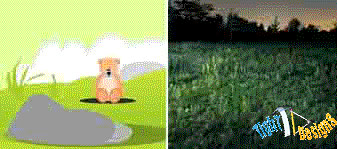
Resolution (DPI)… think “sharpness.” DPI is like the difference between a blurry screenshot and a clear photo. For printing, we need the clear version.
Low-resolution files may be printed as-is (and look fuzzy), or your order may be placed on hold until we receive a better file… which slows down your turnaround.
THESE ARE 72 DPI LOW RES IMAGES
THESE ARE THE SAME IMAGES BUT AT 300 DPI
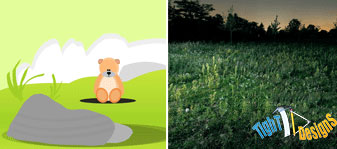
We only accept 300 DPI files and no less.
Color mode (RGB vs CMYK)… think “screen vs printer.”
RGB is how colors look on a phone or monitor. CMYK is how ink prints on paper. If you send RGB, colors can shift when converted, and the print may not match what you saw on screen.
THESE COLORS ARE IN RGB
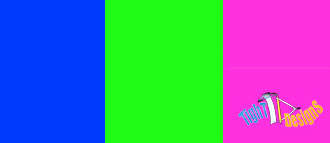
THESE ARE THE SAME COLORS BUT IN CMYK

You should start and finish your designs in CMYK color mode.
Bleed & safe area… think “cutting room.”
After printing, products get trimmed. If your background or image needs to go all the way to the edge, you must extend it past the cut line… that extra area is called bleed. It’s like drawing past the edges so when we trim, you don’t end up with a tiny white border.
Please keep all text at least 0.125″ inside the cut-line (this is your “safe zone” so nothing important gets cut off).
– The bleed for Standard Products is 0.125″.
– The bleed for Booklets and Presentation Folders is 0.25″.
– For Grand4mat Products, please see the G4Mat FAQs for individual substrate guides.
We recommend using our templates at all times.
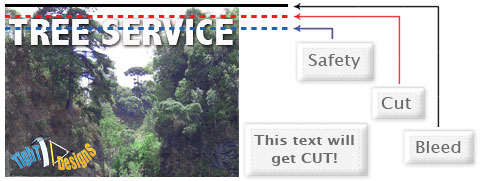
Need a template for your product? Contact us and we’ll email it to you.
How should I set up a Spot UV job?
Spot UV is a clear, shiny coating that goes on specific areas only… like “gloss highlight stickers” on top of your printed design.
To set up a Spot UV job, you must upload two files:
1) Your normal print file
2) A Spot UV mask file that shows exactly where the shiny coating should go
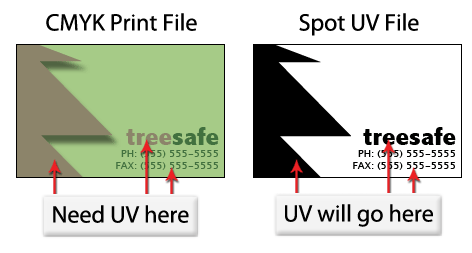
For the best results, create the mask in a vector program like Illustrator or CorelDRAW. (Vector is like clean “math lines” that stay crisp at any size.)
Mask rules (simple):
– Use solid 100% K (black) to mark where you want UV
– Use white where you do NOT want UV
– Do not use shadows, glows, gradients, or grayscale in the mask
Quick way to remember it… black gets shine, white stays normal.
Can I pick up my prints the same day?
At an additional fee, we offer rush service and same-day printing on business cards and flyers. In order to pick up your prints on the same day you must place your order and upload your print-ready artwork by 9AM the day you wish to pick it up.
Currently, we’re experiencing issues with our same day printing service. This message will be changed as soon as the Same Day Printing Service is back online.
Large Format FAQ (banners, posters, signs)
What counts as “large format”?
Large format is anything big… banners, posters, yard signs, window graphics, and wall-sized prints.
Do I need 300 DPI for a huge banner?
Not always. A banner is usually viewed from farther away, so it doesn’t need the same “up-close sharpness” as a business card. Think of it like a billboard… you don’t read it from 2 inches away.
What size should my file be?
Best option… set your file to the exact print size (example: 24″ x 72″). If you can’t, you can build it at half-size or quarter-size, as long as you tell us what you did.
Do banners need bleed?
Sometimes. If your background goes to the edge, add bleed so trimming doesn’t leave a white edge. Also keep important text/logos away from the edges… large format finishing (hemming, pole pockets, grommets) can “eat” the outer area.
What are grommets and hem?
Grommets are the metal rings (like a hoodie eyelet) that let you hang a banner. A hem is a folded edge that adds strength… like folding the end of fabric so it won’t tear.
Outdoor use?
If it’s going outside, tell us… material choices change based on wind, sun, and how long you need it to last.
Web Design FAQ
Do you build websites for local businesses in Pembroke Pines?
Yes. We build and improve websites for local businesses… especially service businesses that want calls, quote requests, or appointment bookings (not just a “pretty site”).
What do you need from me to start?
Think of it like building a house… we need the “address and floor plan” first. That means: your business name, what you sell, your service area, examples of sites you like, and what you want the site to achieve (calls, leads, online payments, etc.).
If you want a quote, contact us and tell us what kind of business you run and what page(s) you need.
Don’t see your question here?
Ask us directly through our contact page.