A lot of people think they have artwork ready for printing… until the printer asks for a print-ready file.
That is where confusion starts.
Someone may have a logo, a photo of an old business card, a screenshot, or even a rough layout idea and assume that means the job is ready to go. But in printing, print-ready artwork has a very specific meaning. It does not simply mean you have content. It means the file is prepared correctly for production.
If the artwork is not set up properly, the printed result can come out with cut-off text, low image quality, white edges, sizing problems, or delays before the order can even begin.
This post explains what print-ready artwork actually means, what printers usually need, and what does not count as a print-ready file.
Quick Answer: What Is Print-Ready Artwork?
Print-ready artwork is a file that has been prepared correctly for professional printing.
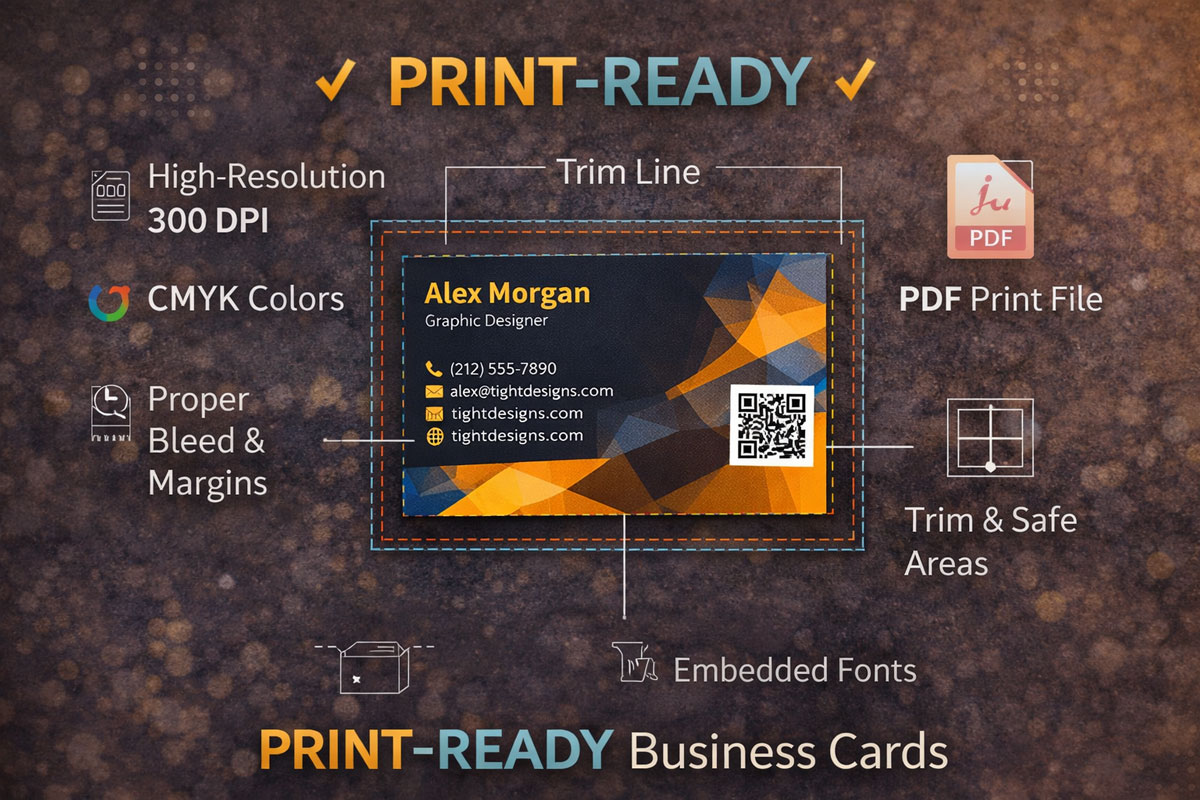
That usually means the file includes:
- the correct finished dimensions
- bleed
- a safety margin
- high enough resolution
- the right file format
- properly placed text and graphics
- artwork exported in a way the printer can use without rebuilding it
In simple terms, a print-ready file is one that can go into production with minimal or no correction.
Why Print-Ready Artwork Matters
Printing is physical. The file on the screen has to translate into something that will be trimmed, cut, and handled in real life.
That is why setup matters so much.
A file that looks fine on a phone or computer may still fail in print if the dimensions are wrong, the resolution is too low, or important text sits too close to the edge. Print-ready artwork helps reduce mistakes and helps the final piece come out the way it was intended.
It also speeds things up. If a file is truly print-ready, the printer does not have to pause the order to request fixes, explain setup problems, or rebuild the design.
The Core Parts of Print-Ready Artwork
1. Correct Dimensions
Every printed piece has a final trimmed size.
For example, a standard business card is usually 3.5″ x 2″ after trimming. But the design file should not stop exactly at that size if the background color or graphics go all the way to the edge. That is where bleed comes in.
The main point is this: the artwork must be built at the correct size for the finished product.
If the dimensions are wrong, everything else can go wrong with it… alignment, trimming, proportions, and spacing.
2. Bleed
Bleed is the extra image area that extends beyond the final trim size.
Printers use bleed because trimming is not mathematically perfect down to a microscopic level every single time. A tiny shift can happen during cutting. If the design stops exactly at the trim line, even a small movement can create an unwanted white edge.
Bleed solves that problem by extending background colors, photos, or design elements slightly past the final cut line.
For many print products, bleed is commonly 0.125″ on each side, but the exact requirement can vary by printer and product.
Simple way to think about bleed:
Bleed is extra artwork that gets cut off on purpose so the final piece looks clean.
3. Safety Margin
If bleed protects the outside edge, the safety margin protects the inside content.
A safety margin is the space between important content and the trim edge. Text, logos, phone numbers, and other critical elements should sit far enough inside the design so they do not risk being cut too close or looking crowded near the edge.
Even if the trim is only slightly off, a good safety margin helps keep the printed piece looking balanced and professional.
Simple way to think about safety margin:
Bleed is for backgrounds going outward. Safety margin is for important content staying inward.
4. File Format
A print-ready design should usually be exported in a file format the printer can work with reliably.
Common print-ready formats include:
- AI
- EPS
- sometimes high-quality PNG or TIFF, depending on the job
In many cases, PDF is the most common and safest print-ready format because it preserves layout, text placement, and vector information well when exported correctly.
The right format depends on the job, but the larger point is this: not every file is suitable for print production.
A file that is easy to send is not always a file that is ready to print.
5. Resolution
Resolution affects how sharp images appear when printed.
For most print work, images should generally be 300 DPI at the size they will actually print. DPI stands for dots per inch. Higher DPI usually means more image detail in print.
Low-resolution images may look acceptable on a screen, especially a small phone screen, but still print blurry, pixelated, or soft.
This is one of the most common issues with customer-supplied files.
Why this happens:
Screens do not demand the same quality as print. A file that looks “good enough” digitally may not hold up physically once it is enlarged or printed.
6. Properly Built Artwork
A print-ready file is not just about dimensions and resolution. The actual layout has to be built correctly too.
That can include things like:
- keeping text inside the safety area
- making sure logos are placed cleanly
- using the correct page size
- avoiding stretched images
- exporting without accidental crop issues
- making sure fonts or graphic elements stay consistent
A file can technically exist and still not be production-ready.
What Print-Ready Artwork Is Not
This is where a lot of people get tripped up.
Having something related to the design is not the same as having print-ready artwork.
Here are common examples of what does not count as print-ready artwork:
An idea
An idea is a starting point, not a production file.
Knowing what you want on the card or flyer is helpful, but it still has to be designed and exported correctly for printing.
A photo of a previous business card
A photo can show what the old card looked like, but it is not the actual artwork file.
Photos introduce perspective, lighting distortion, blur, glare, and low detail. They are useful as a reference, not as a print-ready replacement.
A logo by itself
A logo is only one piece of the design.
Even if the logo is high quality, the full print layout still has to be created with the right dimensions, bleed, spacing, and export settings.
A sketch on paper
A sketch is a concept guide.
It can help communicate layout ideas, text placement, and rough structure, but it is not a finished production file.
A screenshot
Screenshots are almost never suitable for printing professional marketing materials. They are usually low resolution and are not built to the correct print dimensions.
A file from the wrong size
Even if the design looks close, a file created at the wrong dimensions is not truly print-ready for a different printed product.
Common Misunderstandings About Print-Ready Files
“It looks good on my phone”
That does not mean it will print well.
Phones hide a lot of quality issues because the screen is small and backlit. Print exposes them.
“I have the logo, so I have the artwork”
Not necessarily. A logo is not the same as a finished card, flyer, or banner layout.
“I can send a picture of the old one”
That may help as a reference, but it is usually not enough for direct production.
“The file exists, so it must be ready”
Some files still need resizing, rebuilding, bleed, better images, or proper export before they are usable.
What a Printer Usually Needs From You
If you want to avoid delays, the most useful thing to provide is a properly prepared file that matches the product you are ordering.
Depending on the project, that may include:
- the final print-ready PDF or source file
- logos in high quality
- correct spelling of names, phone numbers, and contact details
- linked or embedded images that are high enough resolution
- confirmation of the final size
- confirmation that the file includes bleed if needed
The cleaner the file, the smoother the order usually goes.
Why Printers Ask for Specific Setup Rules
These requirements are not there just to be difficult.
They exist because printing is a precision process with real physical tolerances. A file that ignores bleed, safety margin, or resolution can create visible problems in the finished piece. Printers ask for these setup rules to reduce errors, protect quality, and prevent disputes after the job is produced.
In other words, the rules exist because they solve real problems.
How to Know If Your Artwork Is Actually Print-Ready
A file is more likely to be print-ready if you can answer yes to questions like these:
- Is it built to the correct final size?
- Does it include bleed where needed?
- Is the important text kept inside a safety margin?
- Are the images high enough resolution for print?
- Is it exported in a suitable format like PDF?
- Is it already laid out as the final design, not just a concept?
If the answer to several of those is no, the file probably needs work before printing.
Final Thought
Print-ready artwork does not just mean you have content. It means you have a file prepared correctly for production.
That includes the right dimensions, bleed, safety margin, file format, and resolution… plus a layout that is actually built for the product being printed.
And just as important, it does not mean an idea, a logo by itself, a photo of a previous card, or a sketch on paper.
Understanding that difference can save time, reduce delays, and help your printed piece come out cleaner the first time.