
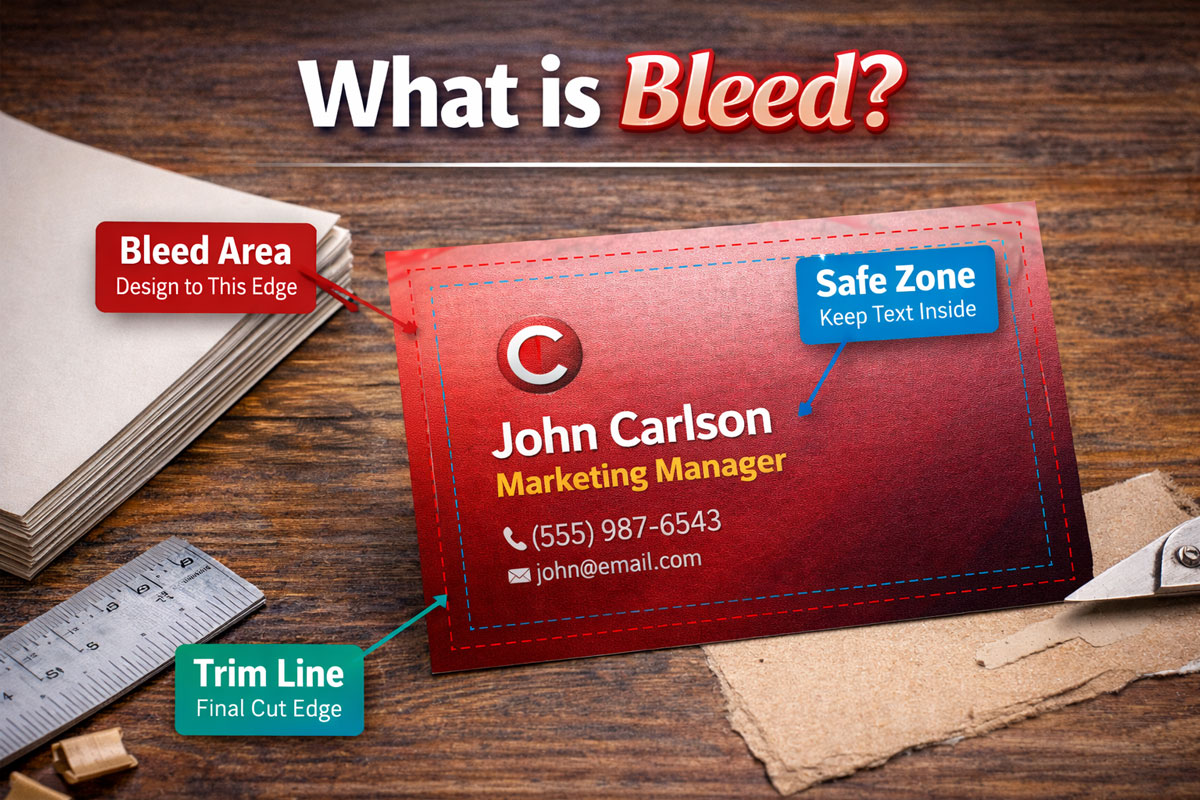
In commercial printing, “bleed” refers to an area of the print that extends beyond the edge of the sheet before trimming. In other words, the bleed is the part of the background or design that overruns the edge of the page.
The bleed zone ensures that after the printed sheet is cut down to the final size, there will be no unprinted edges or white lines on the borders of the finished piece. It serves as a bit of a safety margin for slight shifts or imprecision that can occur during the printing and cutting process.
We require a bleed size of 1/8 of an inch for Standard Products, and 1/4 of an inch for Booklets and Presentation Folders, but it can vary depending on the printer’s guidelines. Printers often provide templates or specifications that include information on the size of the bleed to use.
Without bleed, any small misalignment during trimming could result in the artwork not extending all the way to the edge of the page, which can make the final piece look less professional.
When preparing artwork for print, bleed is only one part of the production process. The final result also depends on the paper stock, print finishes, and cutting methods used to produce the piece. For example, thicker stocks and specialty papers behave differently during trimming, while coatings like gloss or matte can affect how edges appear after the cut. If you’re exploring printing options, you may also want to review our guides on paper options for printed materials, common print finishes, and custom cuts and shapes to understand how these choices work together with bleed to produce a professional final piece.